Gourmia Air Fryer Not Turning On (or Powering On)? 7 Safe Fixes


Quick Answer
Gourmia air fryer not turning on? Start with these checks: test the wall outlet, inspect the plug and cord for damage. let the unit cool if it recently stopped mid-cook, confirm the basket, pan, door, or hood is correctly seated for your model, check for a tripped GFCI outlet or breaker, and try unplugging it for a few minutes before reconnecting. Some Gourmia models also won’t start until a cooking time has been set, so check your display controls before assuming a hardware fault.
Safety Note
Never open the air fryer’s housing, bypass a safety mechanism, or attempt to repair internal wiring unless you’re qualified to work on electrical appliances. If you notice a burning smell, sparks, smoke, melted plastic, or a damaged cord, unplug the unit immediately and stop using it.
Why This Happens — and Why Your Model Matters
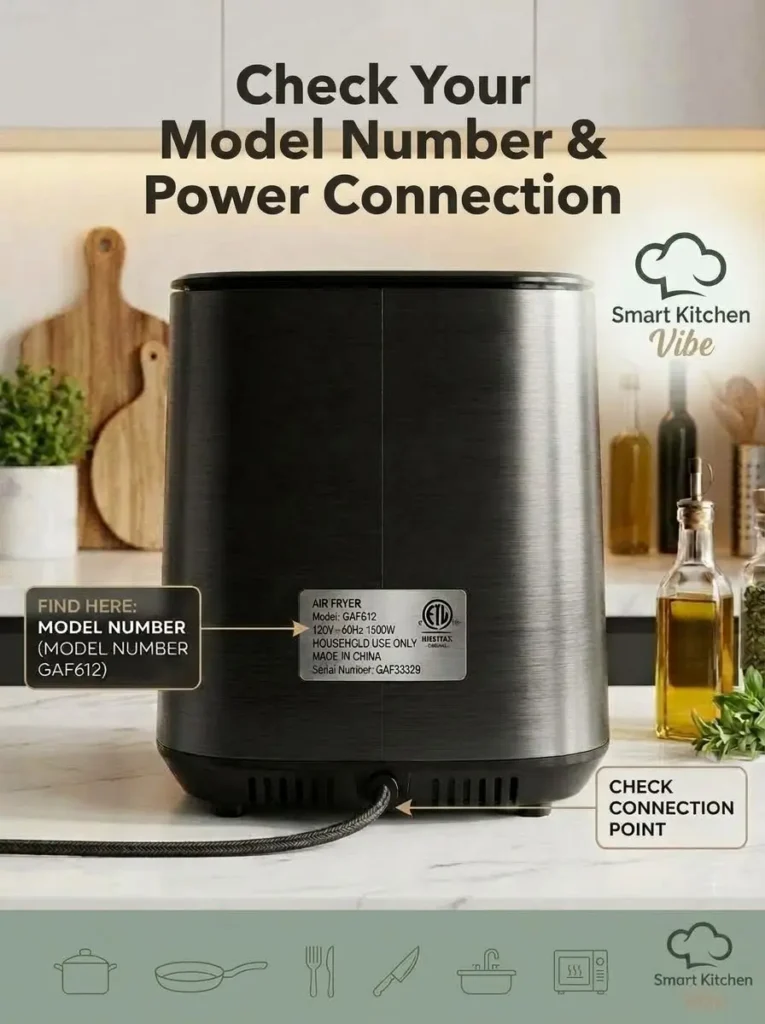
Wondering why your Gourmia air fryer is not turning on? It usually comes down to a simple power problem, an incorrectly positioned basket or pan, an unset cooking timer on some models, or a household circuit issue. Gourmia sells many different air fryer designs — basket-style, dual-basket, digital, and oven-style models — and their own manuals show that troubleshooting steps and controls genuinely differ between them. Before troubleshooting further, find your exact model number (usually starting with GAF, GTF, or GGA, printed on a label on the unit or its packaging), since a fix that applies to one Gourmia model doesn’t always apply to another.
7 Safe Fixes for a Gourmia Air Fryer That Won’t Turn On
1. Check whether the wall outlet has power. Unplug the air fryer and plug a different, known-working device into the same outlet. If that device also doesn’t power on, the problem is likely your outlet or household circuit, not the air fryer. Don’t keep plugging an appliance into an outlet that feels loose, hot, or looks burned.
2. Inspect the power cord and plug. Look for cuts, cracks, frayed insulation, burn marks, or melted plastic. If you find any damage, stop using the appliance — don’t tape over a damaged cord and keep using it.
3. Let the air fryer cool completely. If it stopped after a long cooking session or several back-to-back batches, unplug it, place it on a heat-resistant surface, and let it cool fully before trying again. Note that not every Gourmia model has the same internal thermal protection system, so cooling down is a safe general step rather than a guaranteed automatic reset.
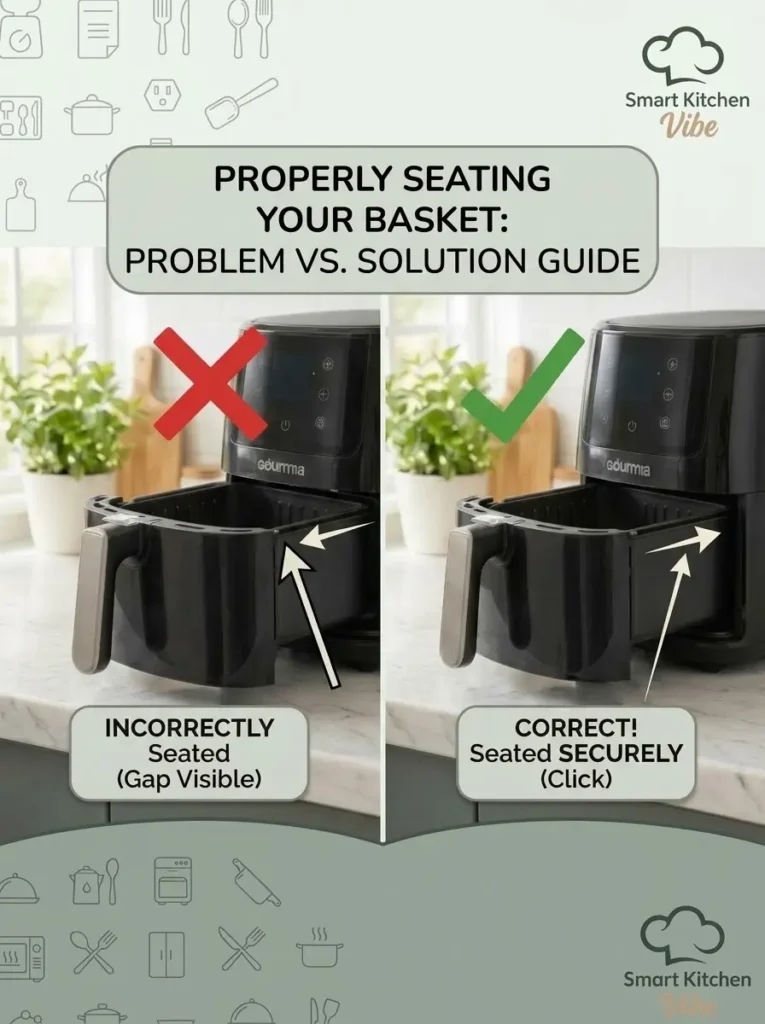
4. Make sure the basket, pan, door, or hood is properly seated. This varies significantly by model—some digital basket models won’t start if the basket isn’t fully inserted, while hood-style models require the hood to be correctly positioned on the base before the cycle begins. Remove and reinsert the component, checking for food debris or damage along the guide tracks. Never force it into place.
5. Check the timer and cooking settings. On some digital Gourmia models, the appliance won’t run until you’ve selected a cooking mode, temperature, and time. If your display is lit but nothing happens when you try to start it, walk through your model’s full startup sequence rather than assuming a hardware fault.
6. Check the GFCI outlet or circuit breaker. A tripped GFCI or breaker, or too many appliances sharing one circuit, can cut power to just that outlet. Check whether nearby outlets have also lost power. If the breaker trips again as soon as the air fryer is plugged in, stop using it and have the circuit checked rather than repeatedly resetting the breaker.
7. Perform a basic power reset. Unplug the unit, wait several minutes, and confirm it’s cooled if it was recently hot, then plug it into a known-working outlet and try the normal startup sequence again. If the display stays completely blank after this, move on to checking your model’s manual or contacting Gourmia support rather than repeating the cycle.
If Your Display Shows an Error Code
Error codes can be model-specific, so don’t assume a code means the same thing across every Gourmia model. On the GAF612, for example:
| Code | Meaning | What to do |
|---|---|---|
| E001 | NTC open circuit | Contact Gourmia customer service |
| E002 | NTC short circuit | Contact Gourmia customer service |
| E003 | NTC temperature over 480°F | Contact Gourmia customer service |
Find the manual for your exact model before assuming what a code means—the same error number can indicate something different on another Gourmia design.
Troubleshooting Table
| What You’re Seeing | What to Check |
|---|---|
| Completely blank display | Test the wall outlet |
| The outlet doesn’t power anything. | Check GFCI/circuit breaker |
| Cord looks damaged. | Stop using the appliance |
| Stopped after long cooking session | Unplug and let it cool |
| Display works, cooking won’t start | Check timer and startup controls |
| Basket won’t fully insert | Check for debris or damage |
| Door/hood model won’t start | Confirm hood/door is correctly positioned |
| Error code appears | Check your exact model’s manual |
| Still completely dead after all checks | Contact Gourmia support |
| Sparks, smoke, or burning smell | Stop using immediately |
What If It’s Completely Dead?
If there’s no display, no indicator light, no fan, and no response even after testing a known-working outlet, you’ve ruled out the common external causes. At this point, the issue may be an internal electrical fault — a power-supply problem, wiring issue, or control board failure. You don’t need to open the appliance to investigate. Instead, stop using it, find your exact model number, check the manufacturer’s manual, confirm your warranty status, and contact Gourmia support or a qualified appliance repair service.
Should You Open the Air Fryer to Check the Wiring Yourself?
No — this isn’t a recommended first troubleshooting step for a household user. Opening the housing exposes you to electrical hazards, and unauthorized repair can also affect your warranty coverage. If the external checks in this guide don’t solve the problem, use Gourmia’s support process or a qualified appliance repair technician instead.
Prevention Tips
- Keep the basket, pan, and accessible areas free of food debris and grease buildup
- Don’t block the air vents during use
- Never force the basket into place — check for debris or damage first if it feels stuck
- Inspect the power cord occasionally for fraying, discoloration, or damage
- Follow your specific model’s electrical guidance, including extension cord ratings if one is used
Frequently Asked Questions
1. Why is my Gourmia air fryer completely dead?
Start with the wall outlet, power cord, circuit breaker/GFCI, and basket or door positioning. If your model requires a cooking time to be set, check that too. If the display stays blank after all of this, the appliance may need service.
2. How do I reset my Gourmia air fryer?
There’s no single universal reset for every Gourmia model. As a general step, unplug it for several minutes, let it cool if needed, then reconnect to a known-working outlet. Check your model’s manual for any model-specific reset procedure.
3. Why is my Gourmia air fryer not turning on suddenly?
This can result from a power interruption, a household circuit issue, overheating, an incorrectly positioned component, or an internal fault. If it stays unresponsive after the basic checks above, stop using it and contact support.
4. Why is my Gourmia air fryer’s display blank?
A blank display usually points to a power problem — a dead outlet, damaged cord, or loose connection. Start by testing the outlet with another device before assuming a hardware fault.
5. Can I test my Gourmia air fryer on a different outlet?
Yes, as long as the appliance and cord look undamaged. If the original outlet doesn’t power anything else either, the household circuit is likely the issue, not the air fryer.
6. Should I open my Gourmia air fryer to check for a loose wire?
No. This isn’t a safe first-line troubleshooting step for most users. Internal electrical work should be handled by someone qualified to do so safely.
7. Why won’t my Gourmia air fryer start even though the display is lit?
Check whether a cooking time has been set and whether the basket, pan, or hood is correctly positioned—some models won’t begin a cycle until both conditions are met.
8. Is a Gourmia air fryer covered under warranty?
Many Gourmia products carry a one-year limited warranty, though coverage varies by product and typically requires proof of purchase from an authorized seller. Unauthorized repairs can void coverage, so check your specific model’s warranty terms.
Conclusion
A Gourmia air fryer not turning on is usually caused by something you can safely check yourself—a dead outlet, a damaged cord, an unseated basket, an unset timer, or a tripped breaker—rather than a major internal failure. Work through the checks above in order, and remember that your exact model number matters, since Gourmia’s own manuals show troubleshooting steps and error codes can differ between designs. If the unit remains completely dead or shows any signs of electrical damage, stop troubleshooting and contact Gourmia support.
🛒 Recommended Products
- Klein Tools Outlet Tester Kit with GFCI Tester—quickly confirms whether a dead outlet is the real cause before you spend time troubleshooting the air fryer itself
Affiliate Disclosure: This article may contain affiliate links. If you purchase through one of these links, Smart Kitchen Vibe may earn a small commission at no additional cost to you.
Recommended Guides
- How to Fix an Air Fryer That Won’t Turn On: 7 Easy Fixes
- Instant Vortex Air Fryer Is Not Turning On? Troubleshooting Guide
- How to Clean an Air Fryer Basket Without Damaging It
- Why Is My Air Fryer Making Noise? 7 Causes of Whistling, Rattling & Clicking
References
- Gourmia official product manuals (GAF612 and related models)
- Gourmia warranty and support documentation
Editorial Note
Reviewed by the Smart Kitchen Vibe Editorial Team
This guide is based on general troubleshooting steps documented in Gourmia user manuals. Because controls and safety features can vary by model, always check the manual for your specific Gourmia air fryer before attempting model-specific troubleshooting.