
Why Is My NutriBullet Making a Loud Noise? (7 Causes, Easy Fixes & Prevention Guide)


If you’re wondering why is my NutriBullet making a loud noise, you’re not alone. Many users notice grinding, rattling, buzzing, squealing, or clicking noises after months—or even years—of regular use. While some noise is perfectly normal during high-speed blending, unusual sounds often signal that something inside the blender needs attention.
In many cases, the problem is simple. An overloaded blending cup, insufficient liquid, frozen ingredients blocking the blade, or a worn blade assembly can all make the motor work harder than normal. Fortunately, most of these issues can be fixed in just a few minutes without replacing the entire blender.
However, not every loud noise should be ignored. If the sound is accompanied by smoke, a burning smell, sparks, or severe vibration, continuing to use the blender may cause permanent motor damage or create a safety hazard.
This complete troubleshooting guide explains:
- Why your NutriBullet is making a loud noise
- Which sounds are normal and which are dangerous
- The seven most common causes
- Step-by-step solutions
- Expert maintenance tips
- When it’s time to replace parts—or the entire blender
By the end of this guide, you’ll know exactly how to diagnose the problem and keep your NutriBullet running quietly and efficiently.
Quick Answer
The answer to why is my NutriBullet making a loud noise usually depends on the type of sound you hear. A NutriBullet may become unusually loud because of an overloaded cup, too little liquid, a jammed blade, worn drive gears, failing blade bearings, an improperly locked cup, or motor wear. While some noise is completely normal when blending ice or frozen fruit, grinding, screeching, clicking, or burning smells usually indicate a mechanical problem that should be fixed before further use.
Quick Fix Checklist
✔ Reduce the amount of ingredients.
✔ Add more liquid.
✔ Check for frozen food stuck under the blade.
✔ Inspect the blade assembly.
✔ Make sure the cup locks completely.
✔ Stop using the blender if you notice smoke, sparks, or a burning smell.
At a Glance: What Does the Noise Mean?
| Noise Type | Most Likely Cause | Seriousness | Recommended Action |
|---|---|---|---|
| Smooth humming | Normal blending | ✅ Safe | No action needed |
| Loud vibration | Overloaded cup | 🟡 Medium | Remove some ingredients |
| Buzzing | Thick mixture or too little liquid | 🟡 Medium | Add more liquid |
| Grinding | Blade jam or worn gears | 🔴 High | Stop and inspect immediately |
| Clicking | Worn drive gear | 🔴 High | Replace damaged gear |
| High-pitched squealing | Worn blade bearings | 🔴 High | Replace blade assembly |
| Burning smell with loud noise | Motor overheating | 🚨 Critical | Unplug immediately |
Why Is My NutriBullet Making a Loud Noise? Is It Normal?
Yes to a certain extent.
Unlike many traditional countertop blenders, NutriBullet blenders use high-speed motors that can spin at extremely high RPMs. Because of this, they naturally produce more noise, especially when blending frozen fruit, ice cubes, nuts, seeds, or thick smoothie mixtures.
The following sounds are generally considered normal:
- A steady humming sound while blending.
- Brief rattling when crushing ice.
- Slight vibration during thick smoothie preparation.
- Increased noise when processing frozen ingredients.
These sounds usually disappear once the ingredients begin circulating properly.
When Noise Is Not Normal
If your NutriBullet suddenly becomes much louder than before—or starts producing grinding, screeching, clicking, or metallic noises there is usually an underlying mechanical issue.
Warning signs include:
- Grinding metal sounds
- Loud clicking every rotation
- High-pitched squealing
- Burning plastic smell
- Smoke coming from the motor base
- Blade stopping while the motor continues running
- Sparks inside the base
- Excessive vibration or shaking
If you notice any of these symptoms, unplug the blender immediately before inspecting it.
Safety Tip: Never attempt to remove the blade assembly or inspect internal components while the blender is plugged into a power outlet.
7 Reasons Why Is My NutriBullet Making a Loud Noise
Most loud-noise complaints are caused by just a few common problems. Start with the easiest causes first before assuming the motor has failed.
1. Overloaded Blending Cup (Most Common Cause)
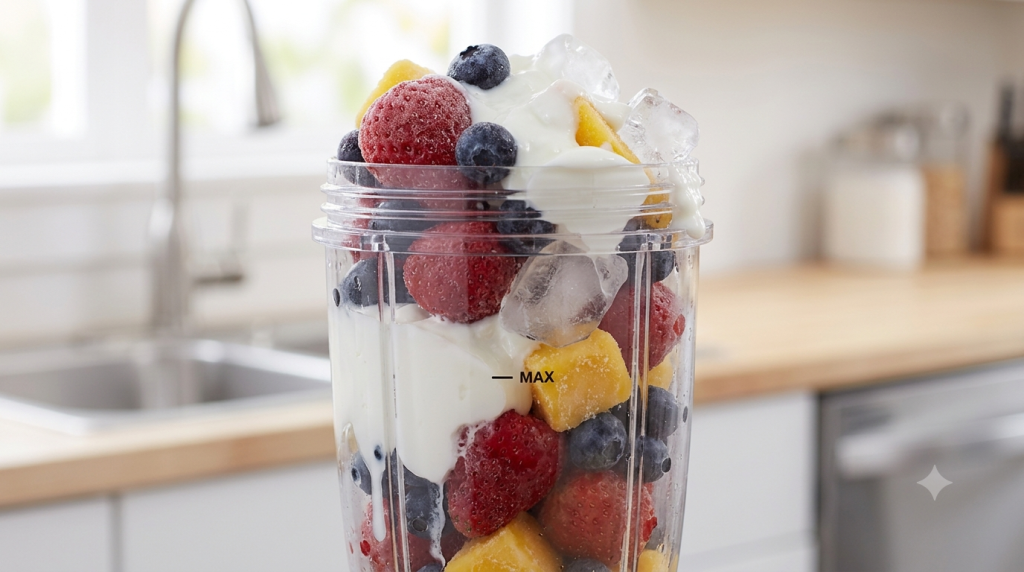
Overfilling the blending cup is the number one reason a NutriBullet becomes unusually loud.
When ingredients are packed above the MAX fill line, the extractor blade cannot create the powerful vortex needed to circulate food properly. Instead of smoothly pulling ingredients toward the blade, the motor is forced to push through a dense mass of food.
As resistance increases, the motor works harder, generating more vibration and significantly more noise.
Common Symptoms
- Deep humming sound
- Excessive vibration
- Blender shakes during operation
- Ingredients remain stuck at the top
- Poor blending performance
How to Fix It
- Turn off and unplug the blender.
- Remove roughly one-third of the ingredients.
- Blend in two smaller batches.
- Never exceed the MAX fill line.
Pro Tip: Smaller batches not only reduce noise but also produce smoother blends and help extend the motor’s lifespan.
2. Too Little Liquid
A NutriBullet relies on liquid to move ingredients continuously through the blade.
Without enough liquid, frozen fruit, leafy greens, or protein powder can create a thick mixture that prevents proper circulation. The motor must then fight against excessive resistance, making the blender noticeably louder.
Symptoms
- Loud buzzing sound
- Ingredients stuck above the blade
- Poor vortex formation
- Blender struggles to blend evenly
Easy Fix
Add more liquid gradually until a smooth vortex forms.
Good liquid options include:
- Water
- Milk
- Almond milk
- Coconut water
- Juice
As a general rule, thick smoothie recipes require more liquid than users expect.
দারুণ! এবার Part 2 লিখছি। এটি আগের অংশের ধারাবাহিকতা।
3. Blade Jam
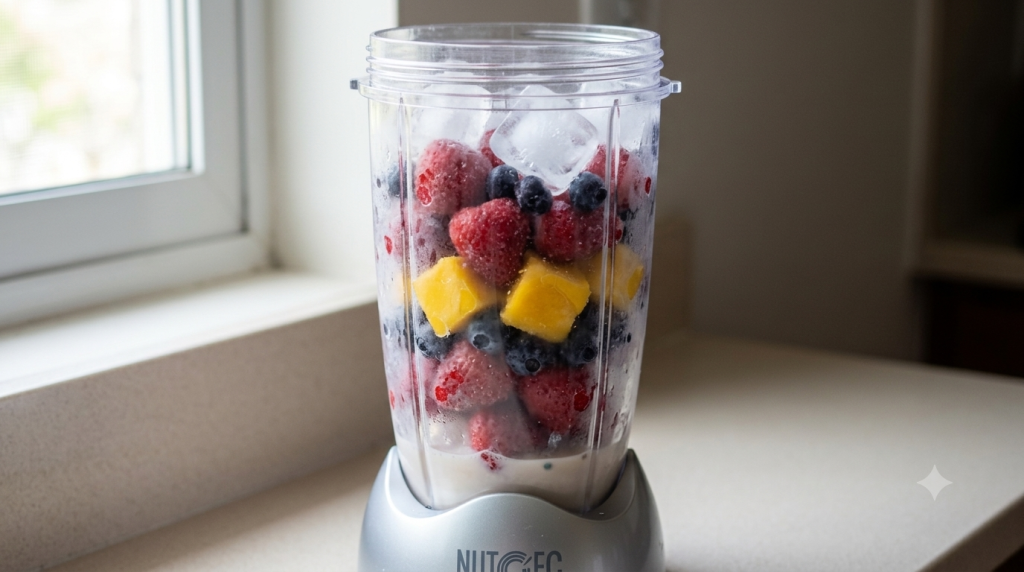
A blade jam is one of the most common reasons a NutriBullet suddenly becomes much louder than normal. Large frozen fruit chunks, oversized ice cubes, or hard ingredients can become trapped beneath the extractor blade, preventing it from rotating freely.
When this happens, the motor continues trying to spin the blade. Instead of blending ingredients smoothly, it struggles against the obstruction, producing grinding, knocking, or rattling noises. If ignored, a blade jam can eventually damage the drive gear or overheat the motor.
Common Symptoms
- Loud grinding noise
- Repeated knocking or rattling
- Blade stops suddenly
- Blender vibrates excessively
- Ingredients remain stuck
How to Fix It
- Unplug the blender immediately.
- Remove the blending cup from the power base.
- Unscrew the extractor blade assembly.
- Carefully remove any food or ice trapped beneath the blade.
- Wash the blade assembly thoroughly.
- Reassemble the blender and test it again.
Pro Tip: Never force your NutriBullet to blend through a jam. Doing so can strip the drive gear or permanently damage the motor.
4. Worn Drive Gears
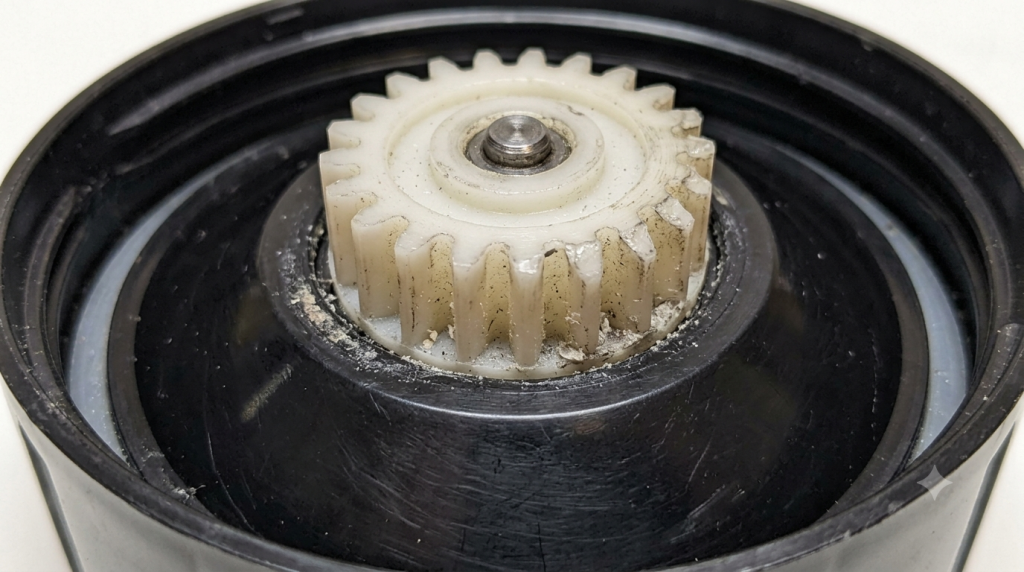
The drive gear is responsible for transferring power from the motor to the blade assembly. Every time you use your NutriBullet, the plastic gear teeth experience friction and wear. After hundreds of blending cycles, these teeth may become rounded, chipped, or cracked.
As the gears lose their grip, they begin slipping against each other. This often produces a loud clicking, grinding, or vibrating sound during operation.
Common Symptoms
- Repeated clicking sounds
- Plastic grinding noise
- Rough vibration from the base
- The blender still works but sounds much louder
- Noise becomes worse over time
How to Inspect the Drive Gear
- Unplug the blender.
- Remove the cup.
- Look inside the power base.
- Inspect both the motor drive gear and the blade gear.
- Check for:
- Rounded teeth
- Missing plastic
- Cracks
- Plastic dust
- Uneven wear
Easy Fix
If either gear is damaged, replace the worn component before continuing to use the blender.
Replacing a drive gear is much less expensive than replacing an entire motor.
5. Damaged Blade Bearings
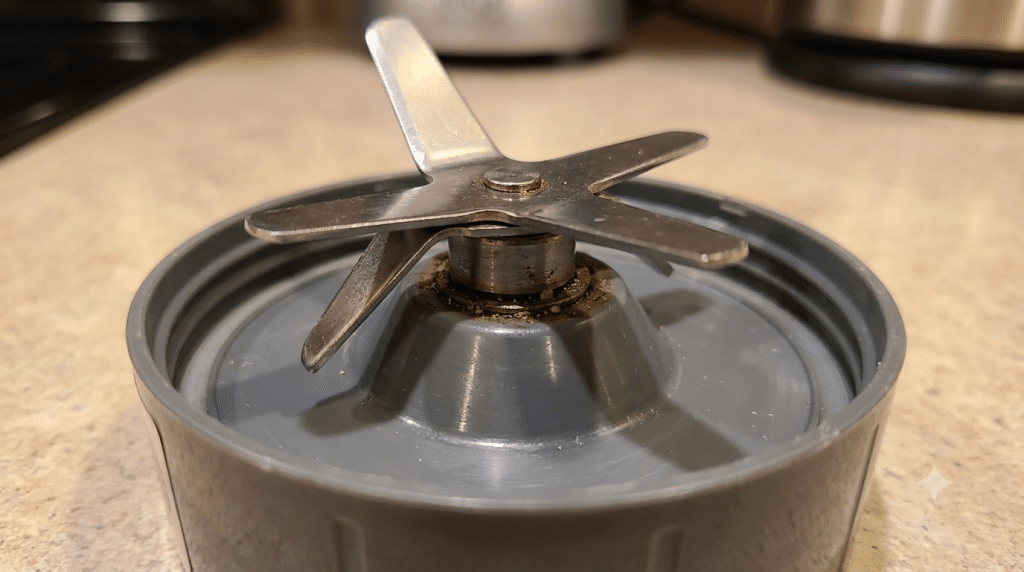
Inside every NutriBullet blade assembly are sealed bearings that allow the blades to spin smoothly at very high speeds.
Over time, moisture, heavy use, or blending hard ingredients can wear out these bearings. Once they begin failing, the blade no longer rotates evenly, causing wobbling, vibration, and unusually loud noises.
Common Symptoms
- Metallic rattling
- High-pitched whining
- Rough blade movement
- Loose blade
- Increased vibration
How to Check
With the blender unplugged:
- Hold the blade assembly.
- Rotate the blade gently by hand.
- It should spin smoothly and quietly.
If the blade feels rough, loose, or produces scraping sounds, the bearings are likely worn out.
Easy Fix
Because the bearings are permanently sealed inside the extractor blade assembly, they cannot be repaired individually.
Replace the complete blade assembly.
Fortunately, this replacement is inexpensive compared to buying a new blender.
6. Cup Not Locked Properly
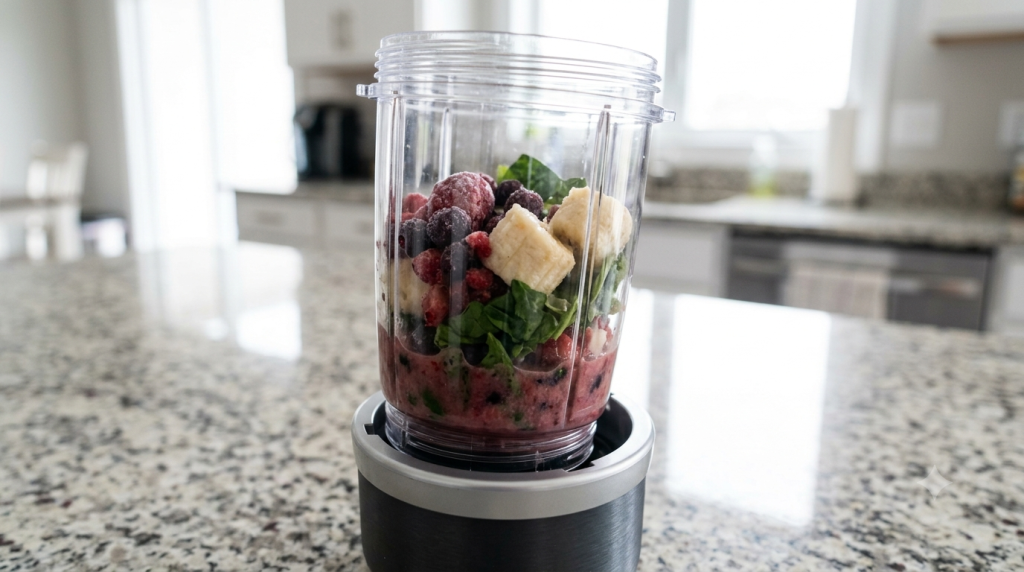
Sometimes the problem isn’t inside the motor at all.
If the blending cup isn’t fully twisted into the locking tabs, it may vibrate while blending. This creates buzzing, rattling, or intermittent clicking noises that many users mistake for motor failure.
Common Symptoms
- Buzzing sound
- Cup vibrates during blending
- Clicking that starts and stops
- Cup feels loose
Easy Fix
- Remove the blending cup.
- Inspect the locking tabs.
- Place the cup back onto the base.
- Twist firmly until it locks completely.
The cup should sit securely with almost no movement.
If it still wobbles, inspect the locking tabs for cracks or excessive wear.
7. Motor Wear or Internal Failure
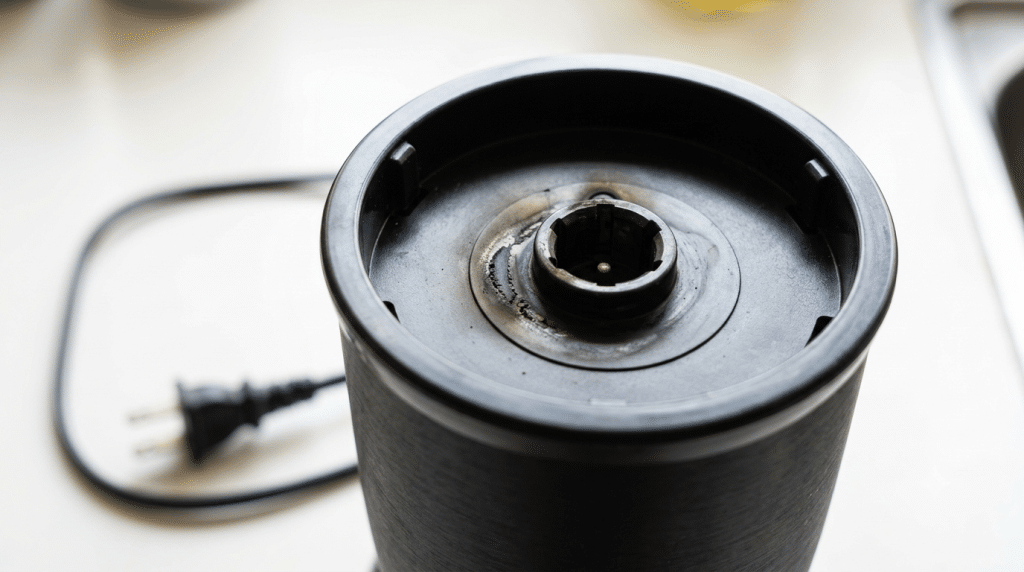
Motor failure is the least common—but most serious—cause of excessive noise.
After years of regular use, internal motor components may wear out. This includes:
- Motor bearings
- Cooling fan
- Armature
- Motor windings
- Internal electrical components
Unlike blade problems, motor issues usually become progressively worse over time.
Common Symptoms
- Extremely loud whining
- Burning smell
- Smoke from the base
- Loss of blending power
- Overheating
- Loud noise even without the cup attached
Easy Fix
Unfortunately, there is no safe DIY repair for a failing motor.
If your NutriBullet is still under warranty, contact NutriBullet Customer Support.
If the warranty has expired, replacing the entire power base is usually the most cost-effective solution.
Quick Troubleshooting Table
| Noise or Symptom | Most Likely Cause | Recommended Fix |
|---|---|---|
| Loud humming | Too little liquid | Add more liquid |
| Deep vibration | Overloaded cup | Reduce ingredients |
| Grinding | Blade jam | Remove obstruction |
| Clicking | Worn drive gear | Replace gear |
| High-pitched whining | Blade bearings | Replace blade assembly |
| Buzzing | Cup not locked | Lock the cup securely |
| Burning smell | Motor overheating | Stop using immediately |
| Smoke | Motor failure | Unplug and replace power base |
How to Prevent Your NutriBullet from Making a Loud Noise in the Future
Preventing loud noise is much easier than repairing damaged components. Following a few simple maintenance habits can keep your blender quieter and extend its lifespan. Understanding why is my NutriBullet making a loud noise can help prevent expensive repairs.
1. Never Overfill the Cup
Always stay below the MAX fill line.
2. Add Enough Liquid
A proper liquid-to-solid ratio reduces motor strain.
3. Cut Ingredients into Smaller Pieces
Large frozen fruit and oversized ice cubes are common causes of blade jams.
4. Blend in Short Cycles
Avoid running the blender continuously for long periods. Blend for about 60 seconds, then allow the motor to cool before continuing if needed.
5. Clean the Blade Assembly After Every Use
Food residue around the blade increases friction and can shorten bearing life.
6. Inspect the Drive Gear Regularly
Check both drive gears every few months for cracks, rounded teeth, or excessive wear.
7. Never Run the Blender Empty
Operating without ingredients creates unnecessary wear and provides no useful blending load.
Expert Maintenance Tips
Small changes in sound are often the earliest warning signs of mechanical wear.
Professional appliance technicians recommend:
- Listen for changes in noise over time.
- Replace worn blade assemblies before they fail completely.
- Keep the power base dry.
- Never ignore grinding or clicking sounds.
- Replace damaged parts as soon as possible to prevent motor damage.
Routine maintenance not only reduces noise but also helps your NutriBullet last for many years.
Frequently Asked Questions (FAQ)
Many users ask why is my NutriBullet making a loud noise after blending ice.
1. Is it normal for a NutriBullet to be loud?
Yes. NutriBullet blenders use high-speed motors, so they naturally produce more noise than many traditional blenders. Blending ice, frozen fruit, or thick ingredients can make the appliance noticeably louder. However, sudden grinding, screeching, or clicking sounds are not normal and usually indicate a mechanical issue.
2. Why does my NutriBullet make a grinding noise?
A grinding noise is commonly caused by a blade jam, worn drive gears, damaged blade bearings, or debris trapped beneath the blade assembly. Stop using the blender, unplug it, and inspect the blade and drive gear before blending again.
3. Can a worn blade assembly make my NutriBullet louder?
Yes. As the extractor blade assembly ages, the internal bearings gradually wear out. This creates additional friction and vibration, making the blender noisier while reducing blending performance. Replacing the blade assembly is often the quickest and most affordable solution.
4. Why does my NutriBullet rattle when blending frozen fruit?
A brief rattling sound is usually normal because frozen ingredients bounce around the cup before a vortex forms. If the rattling continues throughout the entire blending cycle, try adding more liquid, reducing the amount of ingredients, or cutting frozen fruit into smaller pieces.
5. Can overloading damage the motor?
Yes. Frequently filling the cup above the MAX line forces the motor to work much harder than it was designed to. Over time, this can accelerate wear on the drive gears, blade bearings, and internal motor components.
6. Why is my NutriBullet louder than when it was new?
A gradual increase in noise often indicates normal wear and tear. Common causes include worn drive gears, aging blade bearings, a loose blade assembly, or increased motor wear. Routine maintenance and replacing worn parts can restore quieter operation.
7. Should I repair or replace my NutriBullet?
If the problem is limited to a worn blade assembly or drive gear, replacing the damaged part is usually inexpensive and worthwhile. However, if the motor produces smoke, sparks, or a strong electrical-burning smell, replacing the entire power base is generally the better option.
8. Can blending ice make my NutriBullet louder?
Yes. Crushing ice naturally creates more noise because the motor works harder and the ice cubes strike the blade and cup walls. This is normal as long as the sound disappears once the ice has been crushed.
9. How often should I replace the extractor blade?
For most households, replacing the extractor blade assembly every 12–18 months is a good maintenance practice, especially if you use your NutriBullet daily. A fresh blade helps maintain blending performance and reduces unnecessary strain on the motor.
10. How can I make my NutriBullet quieter?
To reduce noise:
- Blend smaller batches.
- Add enough liquid.
- Cut large frozen ingredients into smaller pieces.
- Replace worn blade assemblies.
- Keep the drive gear clean and in good condition.
- Ensure the cup is fully locked before blending.

Final Verdict: Why Is My NutriBullet Making a Loud Noise?
If you’ve been wondering why your NutriBullet is making a loud noise, the good news is that most cases are caused by simple issues rather than a failed motor. Overloading the cup, using too little liquid, or allowing ingredients to jam the blade are among the most common reasons your blender becomes unusually loud.
The key is to identify the type of noise. A brief humming or rattling sound while crushing ice is usually normal. However, persistent grinding, clicking, squealing, or loud whining should never be ignored. Addressing these problems early can prevent more expensive repairs and help extend the life of your blender.
Regular cleaning, proper loading techniques, and routine inspection of the blade assembly and drive gears will keep your NutriBullet running more smoothly, more efficiently, and much more quietly.
If the blender continues making unusual noises even after following the troubleshooting steps in this guide—or if you notice smoke, sparks, or a burning smell—stop using it immediately and contact NutriBullet support or replace the affected component.
Recommended Guides
Continue troubleshooting your NutriBullet with these in-depth guides:
- Why Is My NutriBullet Not Blending?
- Why Is My NutriBullet Smoking?
- Why Is My NutriBullet Leaking From the Bottom?
- NutriBullet Blade Not Turning
- NutriBullet Smart Touch Blender Combo Review
- How to Clean and Maintain Your Smart Blender
These guides cover the most common NutriBullet problems and can help you identify related issues before they become costly repairs.
References
To ensure accuracy, this guide is based on manufacturer recommendations and widely accepted appliance maintenance practices.
- NutriBullet official user manuals & safety guides
- NutriBullet support & troubleshooting resources
- Consumer Reports — blender buying & care guides
🛒 Recommended Products to Fix a Noisy NutriBullet
If the loud noise is caused by worn or damaged components, replacing the faulty part is often much more affordable than buying a new blender.
Recommended replacement items include:
- Replacement Extractor Blade with Silicone Gasket – Compatible with NutriBullet 600W/900W Pro: A worn or loose blade assembly is the #1 cause of grinding or rattling noise this includes a pre-fitted gasket for a tight, secure seal.
- Blender Anti-Vibration & Noise-Reducing Countertop Mat: Placed under the base, this absorbs countertop vibration and noticeably reduces the rattling/buzzing sound during high-speed blending.
For users who blend every day, keeping a spare blade assembly on hand is a simple way to maintain peak performance and reduce unnecessary wear on the motor.
If you’re considering upgrading your appliance, the NutriBullet Smart Touch Blender Combo offers a more powerful motor, automatic blending programs, and a larger-capacity pitcher, making it an excellent choice for families and frequent smoothie makers.
Affiliate Disclosure:
Some links in this article may be affiliate links. If you purchase through these links, Smart Kitchen Vibe may earn a small commission at no additional cost to you. We only recommend products that we believe provide genuine value and have been selected based on research, product quality, and relevance to the topic.
Editorial Policy
Every guide published on Smart Kitchen Vibe is carefully researched using manufacturer documentation, independent product information, and practical troubleshooting experience.
Unusual blender noise almost always traces back to the blade assembly, motor bearings, or an unbalanced load this is consistent across NutriBullet’s personal blender lineup. This guide is based on common noise-pattern diagnostics used by small-appliance repair technicians.




[…] from the Bottom? Nutribullet Blender Blade Not Turning How to Clean and Maintain Your Smart BlenderWhy Is My NutriBullet Making a Loud Noise?Why Is My NutriBullet Not […]