
Why Is My NutriBullet Not Blending? 7 Easy Fixes That Actually Work


However, it can be extremely frustrating when you press the cup down, hear the motor roaring, but realize your ingredients are simply sitting there untouched or partially chunked. When your NutriBullet is not blending properly, it interrupts your routine and leaves you with an unappetizing, uneven smoothie.
In this comprehensive troubleshooting guide, we’ll dive into why your NutriBullet is not mixing properly, explore the 7 most effective fixes, and share expert tips to ensure your blender pulverizes food smoothly every single time.
Quick Answer
If you are wondering why is my nutribullet not blending, the most common culprit is an improper liquid-to-solid ratio or an overfilled blending cup. Without enough liquid, an air pocket forms around the blade (cavitating), causing the Nutribullet blades to spin but not blend the food above. To fix this instantly, unplug the unit, shake the cup to release trapped air, add at least 1/2 cup of liquid, and ensure ingredients stay below the MAX line.
Safety Note
⚠️ SAFETY WARNING: Before inspecting the blade assembly, removing the cup, or reaching into the blending chamber, always unplug the NutriBullet motor base from the electrical outlet. Never attempt to shake or force the cup while the motor is active, and never submerge the motor base in water.
Is It Safe to Keep Using It?
- Safe to keep using: If the motor sounds normal and the issue is simply that ingredients are chunky or stuck near the top, this is a loading problem, not a mechanical one.
- Stop and unplug immediately if you smell burning plastic, see smoke, or hear grinding or scraping metal sounds.
- Time to replace the blade assembly: if the blade feels loose, wobbly, or spins noticeably slower than it used to even with a proper liquid ratio.
Most blending problems are caused by ingredient preparation or loading rather than a faulty motor. Start with the first three causes below before replacing any parts.
Common Causes (Ranked by Likelihood)
- Too little liquid — the single most common cause. Without enough liquid, ingredients can’t circulate into the blade.
- Overloaded cup — packing the cup past the max-fill line prevents proper vortex formation.
- Ingredients loaded in the wrong order — hard or frozen items should generally go in before liquids so they sit near the blade.
- Large or hard chunks — big pieces of frozen fruit, ice, or fibrous vegetables can jam against the blade instead of spinning through it.
- Worn blade assembly — over time, the blade can dull or the seal can wear, reducing blending power.
- Cup not seated or twisted on correctly — if the cup isn’t locked in fully, the blade may not engage properly with the motor.
Fixes
- Add more liquid. Water, milk, or juice should reach at least partway up the ingredients—check your model’s fill lines.
- Reduce the batch size. Blend in smaller portions rather than overfilling one cup.
- Reorder your ingredients. Put soft or liquid ingredients in first, then add frozen or hard items on top, closest to the blade.
- Cut large pieces smaller. Chop frozen fruit, ice, or vegetables into smaller chunks before blending.
- Pulse instead of running continuously. Short pulses can help break up a jam that a continuous spin can’t.
- Check the blade assembly for wear. Remove it (with the unit unplugged) and inspect the blade edge and rubber seal for damage.
Troubleshooting Table
| Symptom | Likely Cause | Fix |
|---|---|---|
| Motor spins but ingredients stay still | Too little liquid | Add more liquid |
| Large chunks remain unblended | Overloaded cup | Blend in smaller batches |
| Blade spins slowly or weakly | Worn blade assembly | Replace the blade assembly |
| Ingredients stuck at the top | Loaded in wrong order | Put liquids first, solids near the blade |
| The cup wobbles or won’t fully engage | Cup not seated correctly | Re-twist the cap until it locks in place |
Why Is My NutriBullet Not Blending? 7 Easy Fixes
1. You’re Overfilling the Cup

One of the most frequent reasons a NutriBullet is not pulverizing food efficiently is simply filling the blending cup past its intended capacity.
Every NutriBullet cup features a clear MAX fill line printed on the side. When ingredients are packed tightly above this line, there isn’t enough empty space inside the cup for the cyclonic action to pull ingredients down toward the spinning extractor blade. Instead of circulating, the food gets compressed against the top, causing the blender to stall or leave large chunks.
- How to Fix:
- Remove the cup from the base and unscrew the blade lid.
- Take out excess ingredients until everything sits safely below the MAX mark.
- Re-seal the blade and try blending in two smaller batches instead of one overloaded cup.
2. There Isn’t Enough Liquid

NutriBullets rely on a liquid vortex to function. The fast-spinning extractor blades pull solid food down, chop it, and force the liquid back up along the sides of the cup.
If you are attempting to blend thick ingredients—such as frozen bananas, raw carrots, kale, or protein powder—without enough water, milk, or juice, the blade will carve out a hollow space in the food right above it. This phenomenon is known as cavitation. You will end up with Nutribullet blades spinning but not blending the contents because the food is literally floating above the spinning blades.
- How to Fix:
- Always add liquid first or ensure liquid makes up at least 30% to 50% of your total cup volume.
- For thick smoothie bowls, add liquid incrementally (a splash at a time) and use short 5-second pulses to break down dense solids.
3. Ingredients Are Too Large or Too Hard
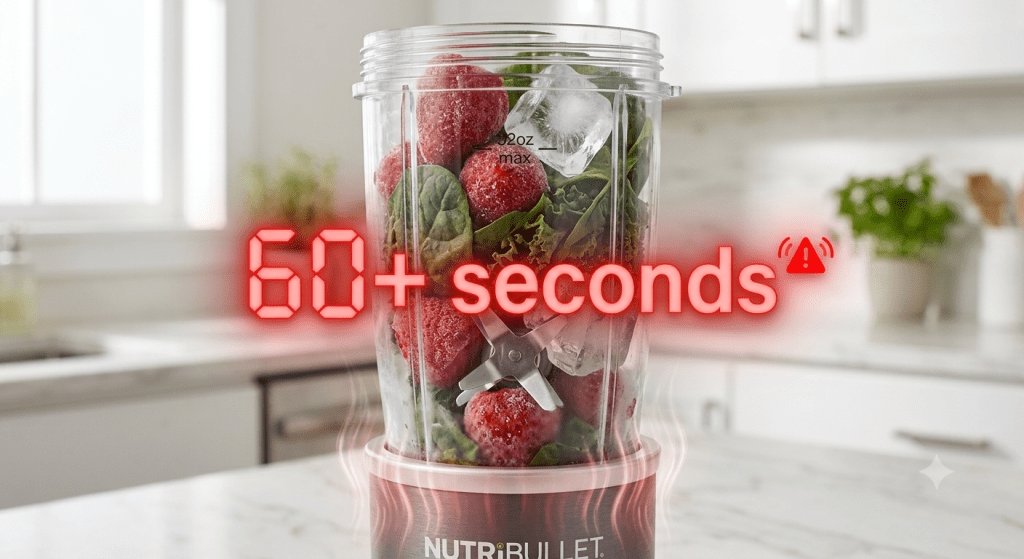
While NutriBullet high-speed blenders are robust, their compact cups are not industrial food processors. Dropping whole apples, large chunks of dense ice, or unchopped fibrous vegetables into the cup can jam the blades or prevent ingredients from circulating smoothly.
If hard ingredients get wedged between the blade edge and the inside wall of the cup, the blade cannot spin fast enough to create a smooth vortex.
- How to Fix:
- Pre-cut tough fruits and vegetables (like apples, beets, and carrots) into 1-inch cubes.
- Use smaller ice cubes or crushed ice instead of large, solid ice blocks.
- Thaw solid-frozen fruit at room temperature for 2–3 minutes before blending.
4. The Blade Assembly Is Dull or Damaged

Over months of daily use, the stainless steel extractor blades can gradually dull, bend, or experience internal bearing wear. A worn-down blade loses its precise angle and cutting efficiency, resulting in a nutribullet not mixing properly and leaving fibrous strings or coarse chunks in your beverages.
Furthermore, if the central bearing beneath the blade starts to wear out or rust, it increases friction, slowing down the rotational speed even if the motor base is operating at full power.
- How to Fix:
- Inspect the blade edge visually (with the base unplugged) for visible nicks, rust, or physical bending.
- Try turning the metal blade manually with a towel; if it feels stiff, gritty, or loose, the bearing assembly has failed.
- Replace the extractor blade lid with a new, genuine NutriBullet replacement part.
🔗 Related Troubleshooting: If your blade is completely stuck or refusing to turn at all, read our detailed guide on NutriBullet Blade Not Turning. Causes & Fixes.
5. The Motor Is Overheating

All NutriBullet models are equipped with an internal thermal switch designed to protect the motor from melting or burning out. If you run your blender continuously for more than 1 minute or force it to process dense, liquid-deficient mixes, the motor generates extreme heat.
When the thermal cutoff triggers, the blender will suddenly stop blending or shut off mid-cycle to cool down. In some cases, overworking an overheated motor can also release a strong burnt rubber or electrical odor.
- How to Fix:
- Immediately unplug the power base from the wall outlet.
- Remove the cup and let the motor base rest undisturbed in a cool, well-ventilated area for 15 to 20 minutes.
- Once the internal thermal breaker resets automatically, plug it back in and resume blending with added liquid.
🔗 Related Troubleshooting: If you notice smoke or a persistent burning odor coming from your blender base, check out our guide on Why Is My NutriBullet Smoking? Causes & Fixes.
6. The Cup Isn’t Locked Properly

To prevent accidental operation, NutriBullet power bases feature 3 plastic activation slots (micro-switches) along the inner top rim. For the motor to engage and spin the blade at full speed, the clear plastic tabs on your blending cup must depress these internal pins completely.
If the cup is twisted loosely, tilted at an angle, or if dried smoothie residue has accumulated inside the base slots, the activation pins won’t trigger properly. This causes intermittent power drops or prevents the motor from driving the drive gear.
- How to Fix:
- Inspect the plastic tabs on the lip of your cup to ensure none are cracked or broken off.
- Clean the inside activation slots of the power base using a cotton swab dipped in rubbing alcohol.
- Press the cup down firmly and twist clockwise until you feel it lock securely into place.
7. The Motor Base Has a Mechanical Problem

If you have verified that your liquid ratios are correct, your cup is locked, and your blades turn smoothly by hand, but your Nutribullet won’t blend under load, the issue may be mechanical.
Over time, the black rubber drive gear on top of the motor base or underneath the blade lid can strip, melt, or wear down its teeth. When drive gear teeth are worn flat, the motor motor shaft spins empty inside the blade socket without transferring power to the blades when food resistance is applied.
- How to Fix:
- Look closely at the rubber gear on top of the power base. If the gear teeth appear rounded, shaved, or covered in black rubber dust, the gear needs replacement.
- Replacement drive gears are widely available and can be installed easily at home. However, if the internal electrical wiring or motor unit itself has failed, contacting NutriBullet Customer Support or replacing the power base is recommended.
Quick Comparison: Symptoms vs. Solutions
| What You Observe | Likely Cause | Recommended Fix |
|---|---|---|
| Blades spin fast, but food stays at the top | Cavitation / Air Pocket (Lack of liquid) | Unplug, shake cup, add 1/2 cup liquid |
| The motor hums loudly, but blades don’t move | Jammed blades or seized bearing | Clear dense food; check blade rotation manually |
| Smoothie is full of unblended chunks & strings | Dull blades or overfilled cup | Pre-cut ingredients; replace old extractor blade |
| Blender turns off suddenly mid-blend | Motor thermal overload protection triggered | Unplug and let base cool down for 20 minutes |
| Cup won’t push down or engage motor | Sticky base slots or broken cup tabs | Clean base slots with rubbing alcohol; inspect tabs |
When Should You Replace the Blade Assembly?
If you’ve corrected your liquid ratio, batch size, and ingredient order and the blender still struggles, and the blade feels loose or spins slower than it should when tested by hand (unplugged), it’s likely time for a replacement blade assembly rather than a technique fix.
Need a Replacement NutriBullet Blade?
If your blender motor is running strong but worn-out blades are ruining your smoothies, replacing your blade assembly is a cost-effective way to make your NutriBullet perform like new again:
- NutriBullet Replacement Extractor Blade — Restores razor-sharp cyclonic power and smooth vortex blending.
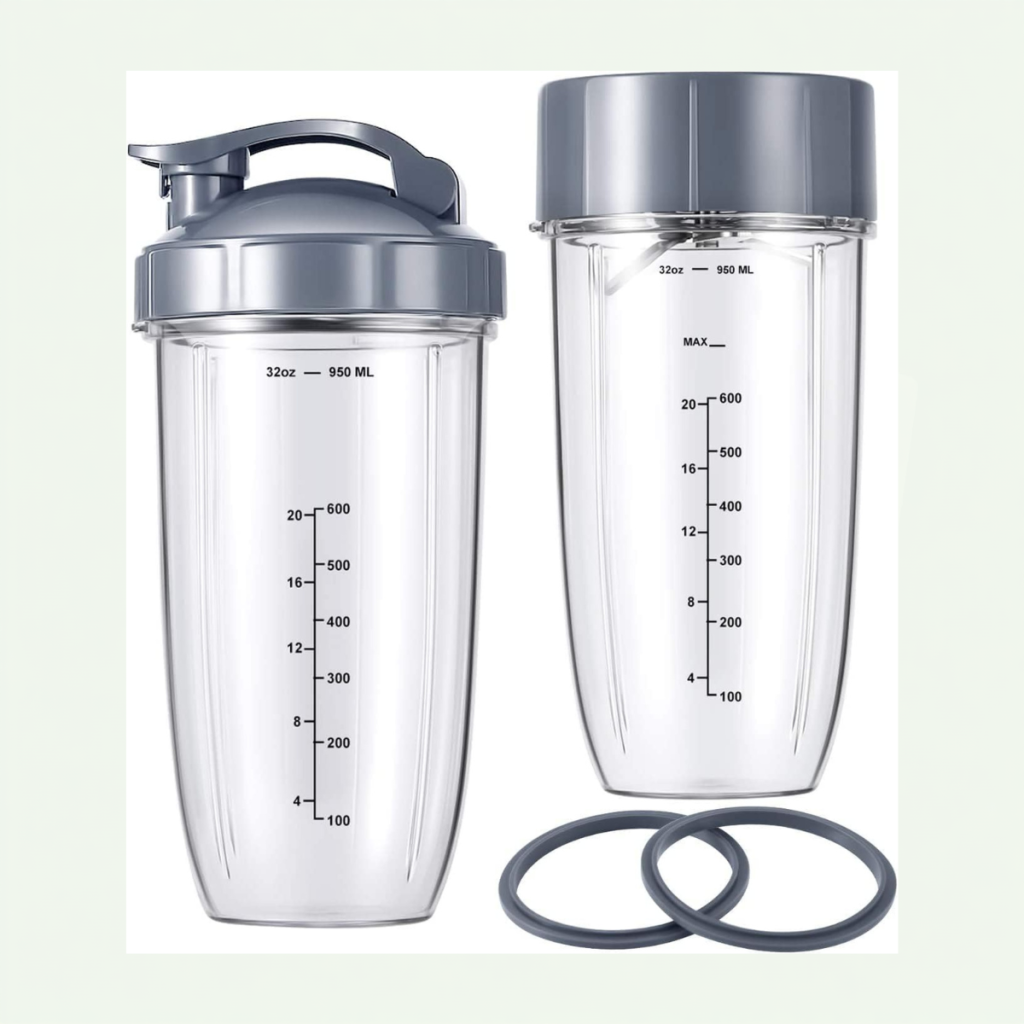
- NutriBullet Replacement Cups & Lid Sets — Perfect if your current cup tabs are worn, chipped, or leaking.
- NutriBullet Rubber Gasket Seals — Prevents liquid leaks from penetrating and destroying internal blade bearings.
How to Prevent Blending Problems
Preventing future blending failures takes only a few simple adjustments to your daily prep routine:
- Follow the Layering Rule: Always load your cup in the correct order for maximum efficiency:
- First (Bottom): Leafy greens and powder supplements.
- Second: Fresh fruits, yogurt, and soft ingredients.
- Third: Liquids (water, milk, and coconut water).
- Fourth (Top): Ice and hard frozen fruits (these will sit closest to the blade when flipped onto the base).
- Add Liquid First or Middle: Never run a blend completely dry. Liquids establish the vortex necessary to pull solid foods into the blade.
- Pulse Before Continuous Blending: Use 3–5 short pulse presses to break down whole frozen fruits and ice before letting the motor run continuously.
- Never Exceed 60 Seconds: Limit continuous blending runs to under 1 minute to protect internal motor bearings and thermal switches.
- Wash Blades Immediately: Rinse your extractor blade under warm tap water right after use. Never submerge blade assemblies in boiling water or clean them in the dishwasher, as high heat degrades the internal bearing grease and rubber seals.
Frequently Asked Questions (FAQs)
Q1: Why does my NutriBullet spin but not blend?
When your NutriBullet motor spins but ingredients aren’t blending, it is usually caused by an air pocket trapped around the blade (cavitation) due to lack of liquid. It can also occur if the rubber drive gear teeth between the base and blade have stripped, preventing power from transferring under heavy food loads.
Q2: Why are chunks left in my smoothie?
Chunks are typically left behind when the blending cup is overfilled past the MAX line, ingredients were loaded in the wrong order, or the extractor blade has become dull from long-term use. Pre-cutting hard ingredients into 1-inch pieces and ensuring sufficient liquid prevents chunkiness.
Q3: Can a dull blade affect blending performance?
Yes. A dull or worn extractor blade cannot slice through fibrous fruits, kale, or seeds efficiently. Instead of creating a smooth puree, a dull blade simply pushes ingredients around the cup, resulting in gritty, unblended drinks and extra strain on the blender motor.
Q4: Why does my NutriBullet stop blending halfway?
If your NutriBullet shuts off abruptly halfway through a blend, the motor’s internal thermal overload protection switch was likely triggered due to overheating. Unplug the unit, let it cool for 15–20 minutes, reduce the density of your ingredients, and try again.
Q5: Can dull blades cause poor blending?
Yes. A dull blade can’t cut through fibrous or frozen ingredients efficiently, which often looks like a blending problem but is really a blade-wear issue.
Q6: Why does my smoothie stay chunky even after blending?
This is usually a liquid or loading issue—not enough liquid or hard ingredients packed too tightly around the blade to move freely.
Q7: Can frozen fruit damage a NutriBullet?
Occasional frozen fruit is fine, but large, rock-hard chunks blended without enough liquid can strain the motor and wear down the blade over time. Cutting fruit into smaller pieces before freezing helps.
Q8: Is it normal for the motor to sound different when the cup is overloaded?
Yes — a straining or bogged-down motor sound usually means the load is too heavy for the blade to move through. Reduce the batch size.
Conclusion
A NutriBullet not blending can certainly ruin your meal prep, but it is rarely a reason to throw away your appliance. By maintaining proper liquid-to-solid ratios, avoiding overfilling past the MAX line, layering ingredients correctly, and replacing dull extractor blades every 6 to 12 months, you can enjoy smooth, perfectly blended beverages every day.
If basic troubleshooting like adding liquid or resetting thermal protection doesn’t solve the issue, inspect your rubber drive gears and blade bearings for wear—or refer to our related guides below for further assistance.
Expert Maintenance Tip
If the blade feels stiff or resistant when turned by hand with the unit unplugged, the bearings may be starting to wear. Replacing the blade assembly at that point — rather than waiting for it to fail completely — helps prevent unnecessary strain on the motor.
Recommended Guides:
- NutriBullet Smart Touch Blender Combo Review
- NutriBullet Blade Not Turning? Causes & Fixes
- How to Clean and Maintain Your Smart Blender
References
- NutriBullet Official User Guides & Product Care Manuals — NutriBullet Official Support
- Small Kitchen Appliance Repair & Motor Thermal Safety Specifications.
Editorial Note
Blending failures in NutriBullet units are usually tied to liquid ratio, ingredient size, or blade wear rather than the motor itself. This guide reflects manufacturer blending guidelines and the most common fixes reported by long-term NutriBullet Original and Pro 900 users.




[…] a Nutribullet blade not spinning usually comes down to reducing ingredient loads, adding enough liquid for a vortex, or replacing a […]
[…] Why Is My NutriBullet Not Blending? […]